
For SAP consultancies of 1 to 10 · EU-hosted · one isolated instance per team
Every decision, traceable to where it was said.
Go Live Friday turns what happened in your meetings into summaries, facts and tasks, and keeps every hour, document and transport tied to its source. Nothing lives only in someone’s head.
- said at 00:14:32 · Lyon fit workshop
- fact confirmed by A. Morgan
- cited in draft answer to t_2212
Product tour
From what was said to what got done.
Eight screens. Click through, or open the demo and poke around.
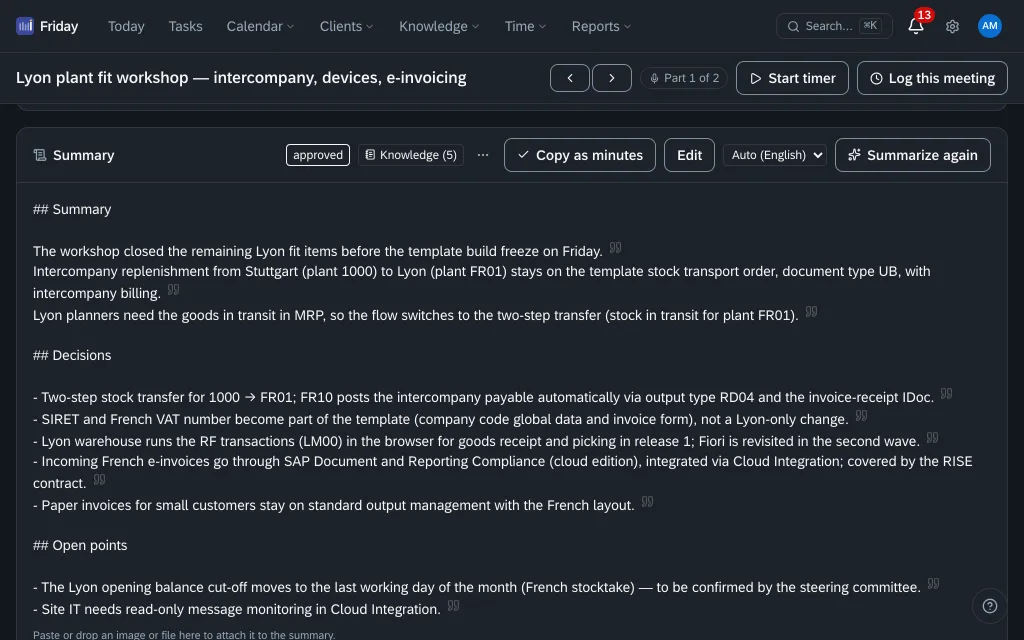
Meetings with evidence
- Capture what happened your way: paste the transcript your meeting tool already made, drop a .vtt or notes file, or type the minutes. Every meeting is a record with agenda, attendees and actions.
- The summary writes itself: decisions, open points and actions drafted from what you captured, each one linked to the line it came from. Nothing is final until you approve it.
- Actions become tasks with their origin attached. Browser recording is there too, with named speakers, for the meetings where everyone agrees to it.
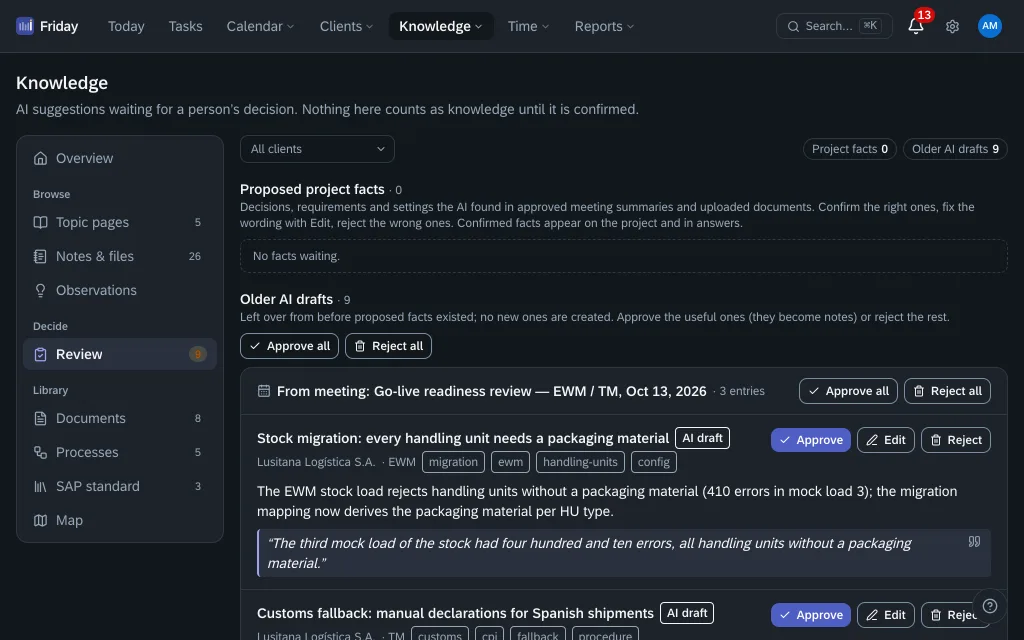
Knowledge that builds itself
- Decisions and facts are extracted from meetings and documents into a review queue. You confirm, edit or reject; nothing counts as knowledge until a person says so.
- One living page per topic, with “changed since approved” and a diff.
- Press ⌘K and type a transaction code. Tasks, transcripts, documents and facts in one list.
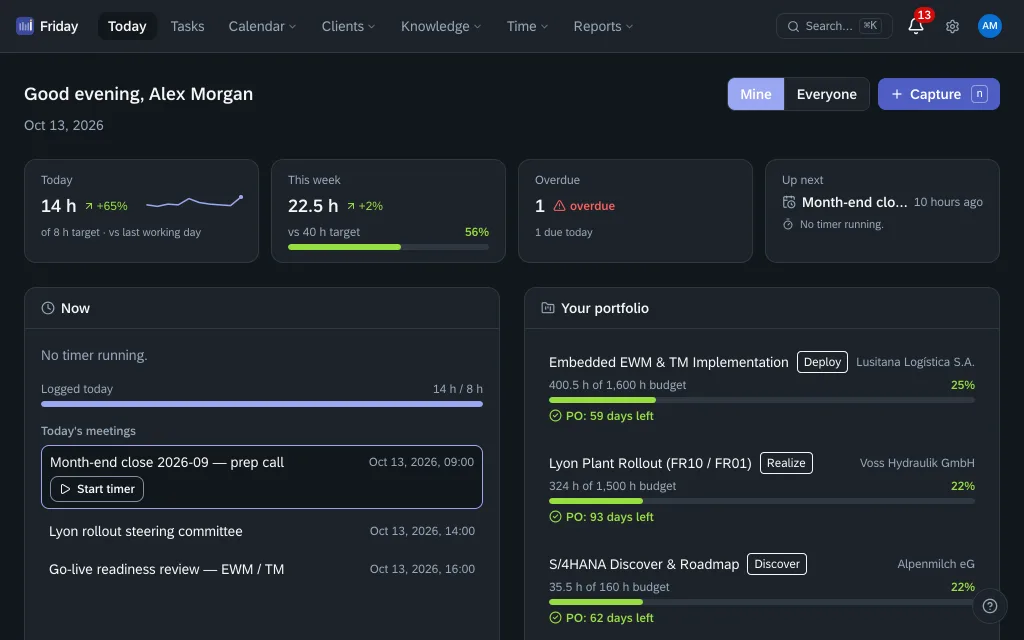
Today
- One morning screen: running timer, due and overdue across every client, what you are waiting on.
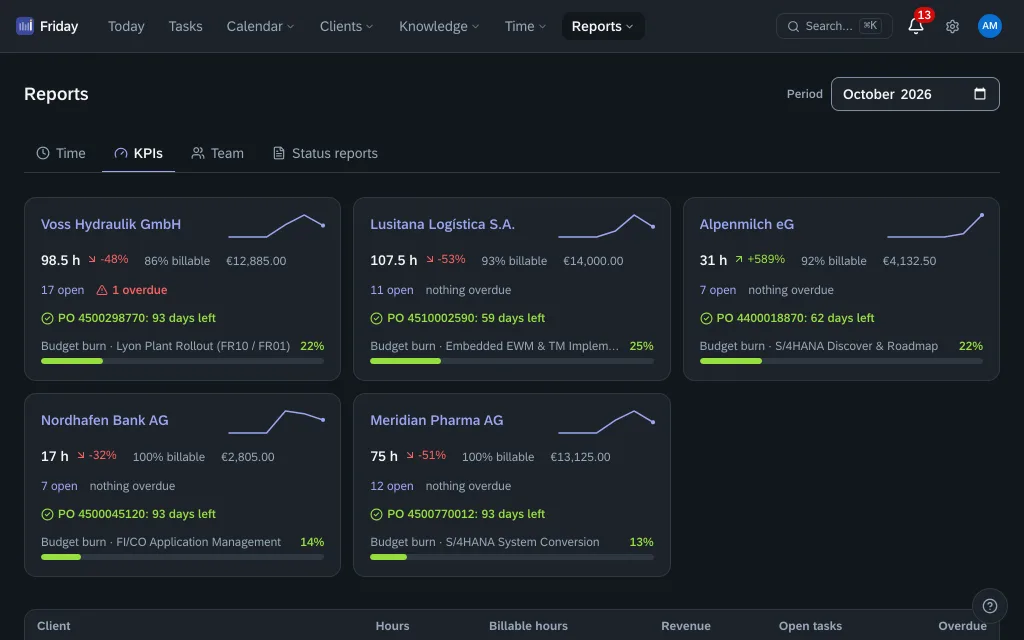
- SLA clocks on the P1 ticket, purchase-order burn per project, this week’s hours against target.
- Pending AI drafts queued for your review. Nothing ships without you.
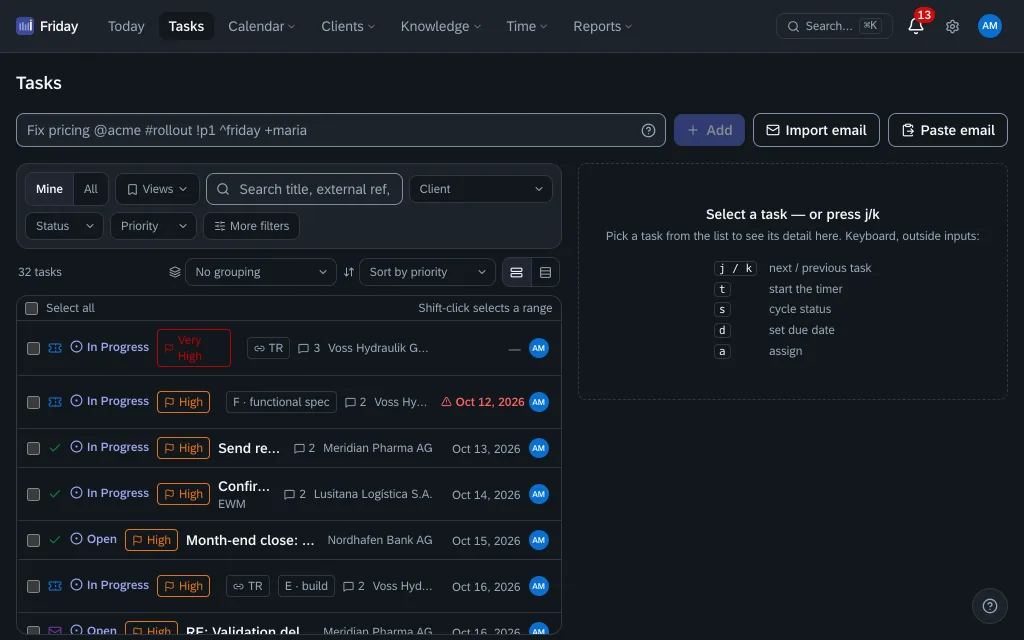
Tasks the SAP way
- Transport requests, WRICEF IDs, OSS notes and SAP objects are fields, not free text.
- Tickets, emails and todos in one queue across all clients, with comments and @mentions.
- Answer a client email with a draft that cites the knowledge it used.
Registers & cutover
- Fit/gap, interfaces, migration objects and test cycles live on the project, not in a lost workbook.
- A cutover runbook with owners, dependencies and readiness. Switch to execution mode on the night.
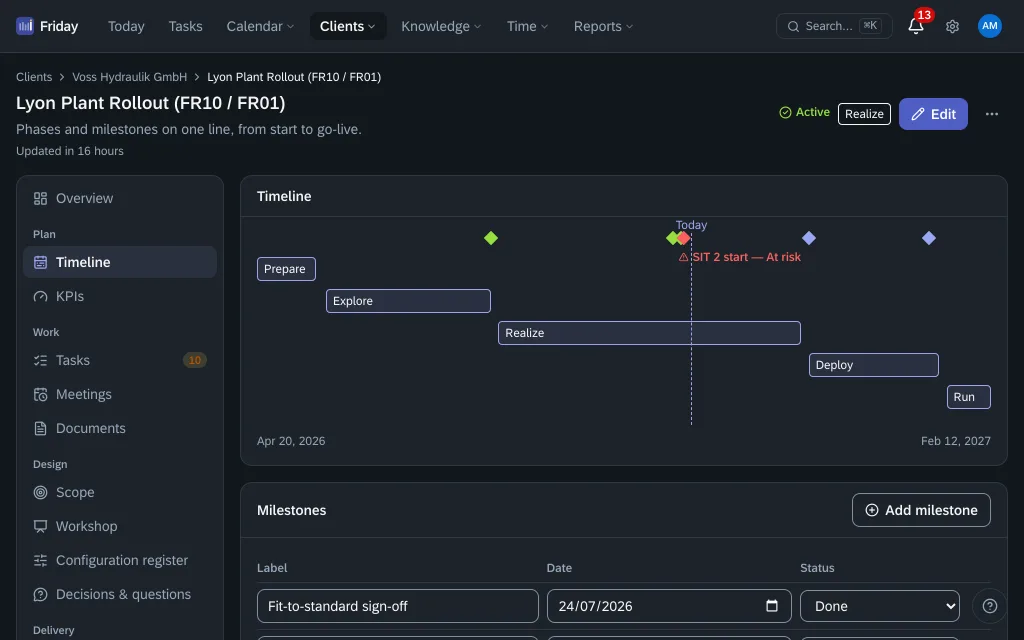
- Phases and milestones on one timeline, feeding KPIs and the status report.
Versioned documents
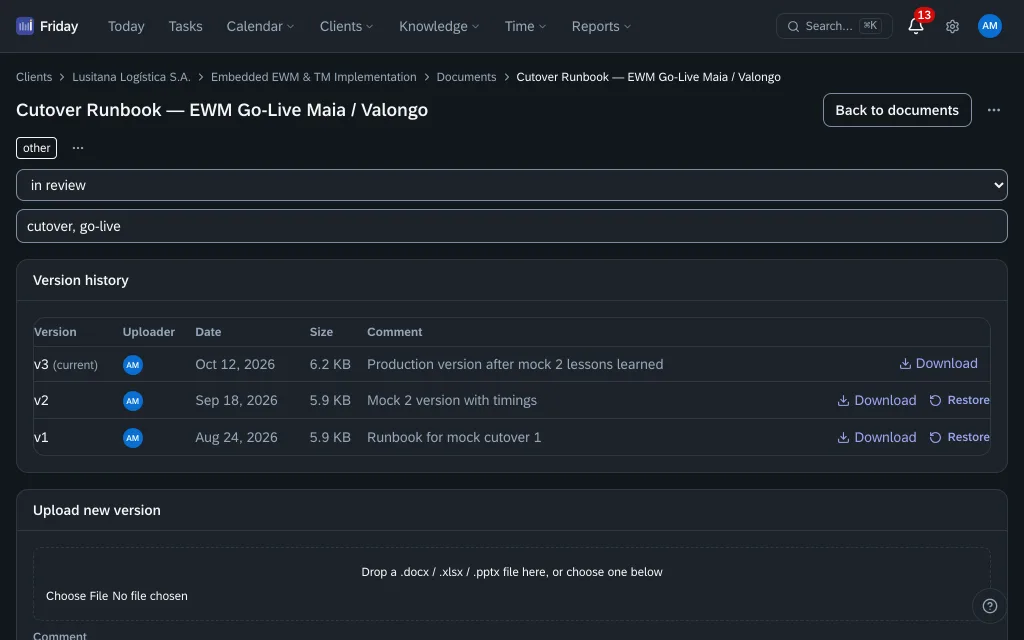
- Specs, concepts, test docs and training material, every version kept with a comment.
- Diff any two versions in place. Restore any of them.
- Generated documents from your own templates, with the client’s facts filled in.
BPMN standards
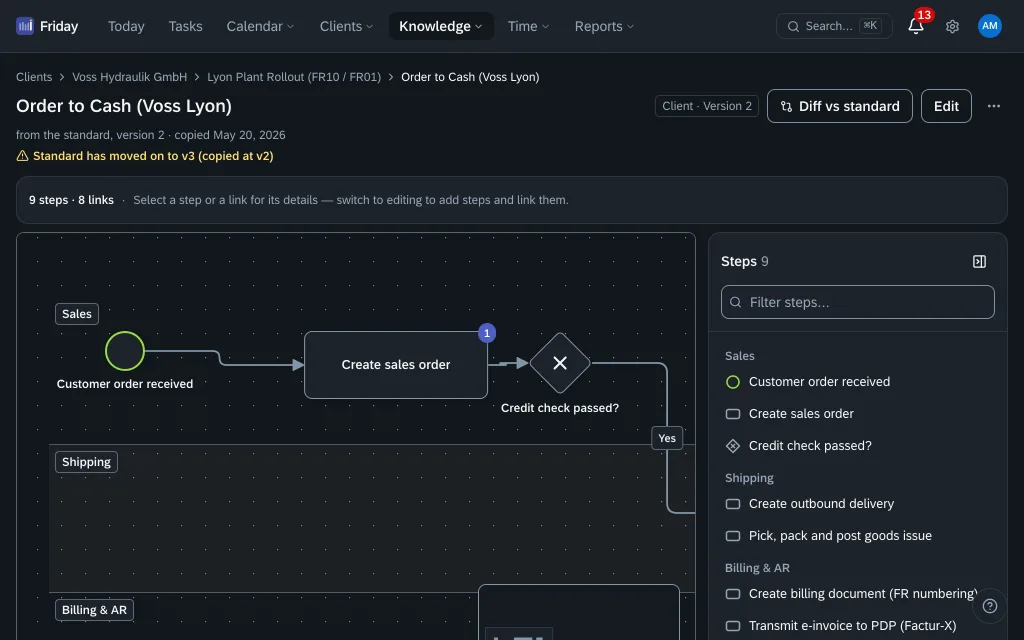
- Your process standards in BPMN, with client variants layered on top.
- The diff overlay shows exactly where a client deviates from your standard.
- Generate test cases from the process instead of typing them.
Time & invoicing feed
- One-click timer from any task, meeting or client. Week grid for corrections. Receipts from the phone.
- The invoicing feed splits rows at rate and purchase-order boundaries automatically.
- Month-end is an export, not an archaeology dig.
Why Friday
Nobody goes live on a Friday. That is the point.
SAP teams avoid Friday go-lives because something always lives in one person’s head: the decision from the March workshop, the reason the interface was descoped, the transport that is still in QA. Go Live Friday exists to make that knowledge boring. Recorded, confirmed, linked to the work. The name is the promise: a go-live calm enough that the weekday does not matter.
“Plant 1200 goes live with EWM, not WM. Decided.”Lyon fit workshop, 00:14:32. Confirmed as a fact, pinned to the project scope, cited in two answer drafts and the May status report.
Ownership
Your client material, in files you own, in a box only you can open.
You handle NDA’d SAP material. We designed for that before anything else.
No database
Your whole tenant is one folder of human-readable JSON and files. Open it, grep it, script against it. No black box, no lock-in.
Physical isolation
One container and one volume per customer. Your client material never shares a process or a filesystem with anyone else. EU-hosted.
Nothing hard-deleted
Every change is versioned, every delete goes to a restorable trash, and backups run nightly with retention.
Obsidian, both ways
A two-way Markdown mirror into your vault, with mobile capture. Readable with or without us.
No walled garden
Data in, data out.
Everything below ships today. No “coming soon” asterisks.
CSV import
Tasks, contacts and time entries from spreadsheets. Bad rows are reported per line and skipped; one typo never sinks the batch.
Email in (.eml)
Drop .eml files in, preview, confirm. Attachments land as knowledge files on the right client.
Calendars, both directions
Subscribe to external ICS calendars and publish your own feed for Outlook, Google or Apple.
Transcripts, notes & recordings
Paste a Teams or Zoom transcript, drop a .vtt or notes file, or type what was said. Recording in the browser, with speakers named, for meetings where everyone agrees.
Personal API tokens
Script against your own instance with per-user tokens, scoped to api or calendar. Your data has an API because it’s yours.
Mobile capture
Under 900px the workbench becomes a capture view: quick-add, running timer, snap a receipt, straight from the client site.
Export is one folder
Leaving means copying your folder. Licence or subscription ends? The workbench goes read-only. Browsable, exportable, never hostage.
Four languages
English, German, Spanish and Portuguese interfaces, chosen per user. Help pages included.
From payment to admin login
How it works
-
Pay via Stripe Checkout
Company name and work email. Payment is handled entirely by Stripe.
-
Your instance is provisioned
Own container, own volume, own subdomain. No shared infrastructure, ready in about a minute.
-
Claim it with your one-time token
After payment you get a claim token, shown exactly once. The first account created with it becomes the admin.
Pricing
One price. No feature gates.
Early access
Your team’s own isolated instance. Every feature, every tier: we differentiate on seats and support, never by crippling the product. Cancel any time.
- Own instance and subdomain, EU-hosted, nightly backups
- Unlimited clients, projects, documents and meetings
- Every feature included. No tiers that hide the good parts.
- Export any time. It’s your folder.
Checkout isn’t open yet. We’re onboarding early-access teams by hand: write to us and we’ll set you up.
Prefer your own infrastructure? Self-hosted licences are available. Get in touch.
Who builds this
Built by a consultant, not a committee.
Go Live Friday is built by one SAP consultant who got tired of the Excel, Outlook and OneNote stack and the Friday-night question “where did we decide that?”. Early-access customers talk directly to the person who writes the code.
Managed instances run in an EU data centre. Sign-in supports TOTP two-factor and OIDC single sign-on, and every tenant runs physically isolated: own container, own volume.
Questions
FAQ
Who owns the data, and how do I get it out?
You do, unambiguously. There is no database: your whole tenant is one folder of human-readable JSON and files. Export is copying that folder, and you can request it at any time. Nothing is hard-deleted, so history comes with it.
Do I have to record my meetings?
No. Most teams paste the transcript their meeting tool already produces, drop a file, or type the minutes; the summary, the evidence links and the actions work from any of them. Browser recording exists for the meetings where everyone has agreed to it. Whatever you capture stays in your tenant’s own volume, and transcription of audio runs against the provider you configure with your own key, or stays off.
Does AI see my data?
Not unless you turn it on. Drafting runs as a local stub by default, with no external calls at all. If you want real drafting, you bring your own key (Anthropic, or any OpenAI-compatible endpoint). Every draft is review-gated and cites its sources: nothing is saved or sent to a client until a person approves it.
How do I get my existing data in?
CSV import for tasks, contacts and time entries, with row-level error isolation so one bad line is reported and skipped instead of failing the file; .eml email ingestion with a preview-then-confirm step, where attachments become knowledge files; ICS subscriptions for external calendars; audio and video upload for past workshops; and personal API tokens if you’d rather script the migration yourself.
What integrations exist today?
The honest list: email (.eml ingestion), calendars (ICS in both directions), CSV import, transcript and notes upload, browser recording, the Obsidian vault mirror and browser folder sync, and a personal API with api and calendar scoped tokens. A Jira / SAP Cloud ALM bridge is on the roadmap. It isn’t shipped yet, so we won’t sell it to you yet.
Where is it hosted, and how is my client data isolated?
EU-hosted. Every customer gets their own container and their own storage volume: physical isolation, not a row-level permission flag. Your NDA’d client material never shares a process, filesystem or database with another tenant, because there is neither sharing nor a database.
What happens when I cancel?
During the free trial, nothing: cancel and you were never charged. After that, you get your data first, then we delete. It’s all self-service on your account page: cancel the subscription, download the complete tenant folder (and, on request, the backups), and we shut down your container and remove the volume. No retention games, no emails required.
Which languages does the interface support?
English, German, Spanish and Portuguese, chosen per user under preferences. The in-app help pages are translated too.
What support do I get?
Email support at us with a next-business-day response target, Monday–Friday, EU business hours (CET/CEST). Early-access customers talk directly to the person who builds the product: report a bug before noon and there’s a fair chance it’s fixed in the same week’s update. Instances are updated with health-gated, auto-rollback deploys and backed up nightly with retention; we publish no uptime SLA yet and won’t pretend otherwise. If you need a contractual SLA, talk to us.
Can I self-host?
Yes. The product ships as a self-contained appliance: one container, one data folder. It runs happily on your own infrastructure, and the licence is verified offline, so it works on a train. An expired licence means read-only, never locked data. Self-hosted licences are available; get in touch.